
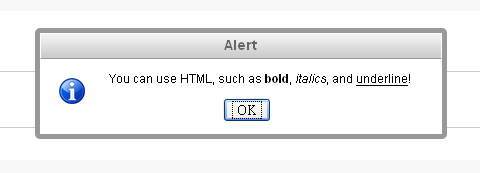
Плагин jQuery Alert Dialogs призван заменить основную функциональность стандартных предупреждений JavaScript, alert(), confirm(), и prompt() функций. Они полностью настраиваются с помощью CSS (это позволит выглядеть вашему сайту гораздо более привлекательно). И вы также можете настроить пользовательский заголовок для каждого диалогового окна.
Эти методы моделируют обычные модальные диалоговые окна. Они автоматически изменяют свое положение при изменении окна браузера. Если включить jQuery UI Draggable плагин, то окна можно перемещать, перетаскивая их за заголовки. В отличие от стандартных JavaScript функций, вы можете использовать HTML в сообщении. Например, чтобы задать переход на новую строку, вы можете использовать либо \n, либо < br / >.
Для работы плагина необходимы следующие скрипты:
< link href="/path/to/jquery.alerts.css" rel="stylesheet" type="text/css" media="screen" />Вызываются функции следующим образом:
* jAlert(message, [title, callback])
* jConfirm(message, [title, callback])
* jPrompt(message, [value, title, callback])
Пример кода:
- <script type="text/javascript">
- $(document).ready( function() {
- $("#alert_button").click( function() {
- jAlert('This is a custom alert box', 'Alert Dialog');
- });
- $("#confirm_button").click( function() {
- jConfirm('Can you confirm this?', 'Confirmation Dialog', function(r) {
- jAlert('Confirmed: ' + r, 'Confirmation Results');
- });
- });
- $("#prompt_button").click( function() {
- jPrompt('Type something:', 'Prefilled value', 'Prompt Dialog', function(r) {
- if( r ) alert('You entered ' + r);
- });
- });
- $("#alert_button_with_html").click( function() {
- jAlert('You can use HTML, such as <strong>bold</strong>, <em>italics</em>, and <u>underline</u>!');
- });
- $(".alert_style_example").click( function() {
- $.alerts.dialogClass = $(this).attr('id'); // set custom style class
- jAlert('This is the custom class called “style_1”', 'Custom Styles', function() {
- $.alerts.dialogClass = null; // reset to default
- });
- });
- });
- </script>
* This source code was highlighted with Source Code Highlighter.Недостатки:
* Клавиши ENTER и ESC (подтвердить/отменить) не работают в WebKit-браузерах
* Draggable plugin на данный момент не работает в Opera
* В IE6 position: fixed не поддерживается.
Демонстрация.
